13 min read
Filing by client isn't enough: job and quote documents in XPM
By The XTK team · Product
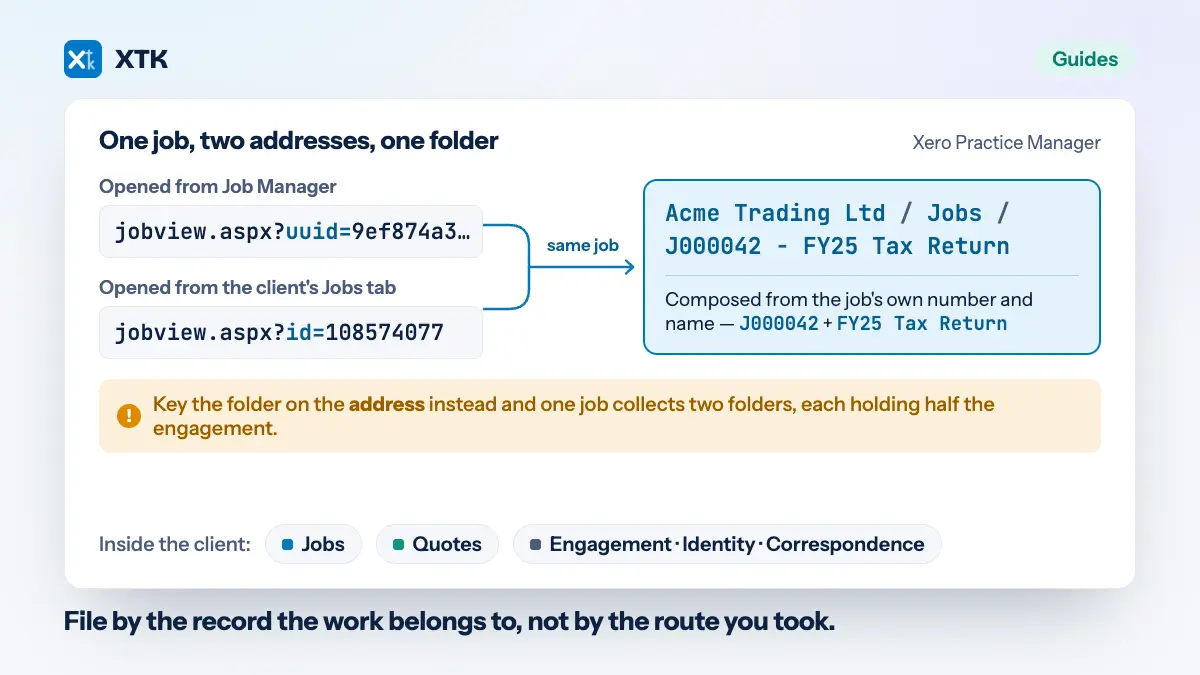
Under the client, in a Jobs layer, in a folder named from the job's own number and name — Acme Trading Ltd / Jobs / J000042 - FY25 Tax Return — with a sibling Quotes layer beside it. That is the short answer, and Xero Practice Manager will not quite give it to you. XPM has attached documents to jobs and quotes for years. What it has never had is a folder for the job in storage you own.
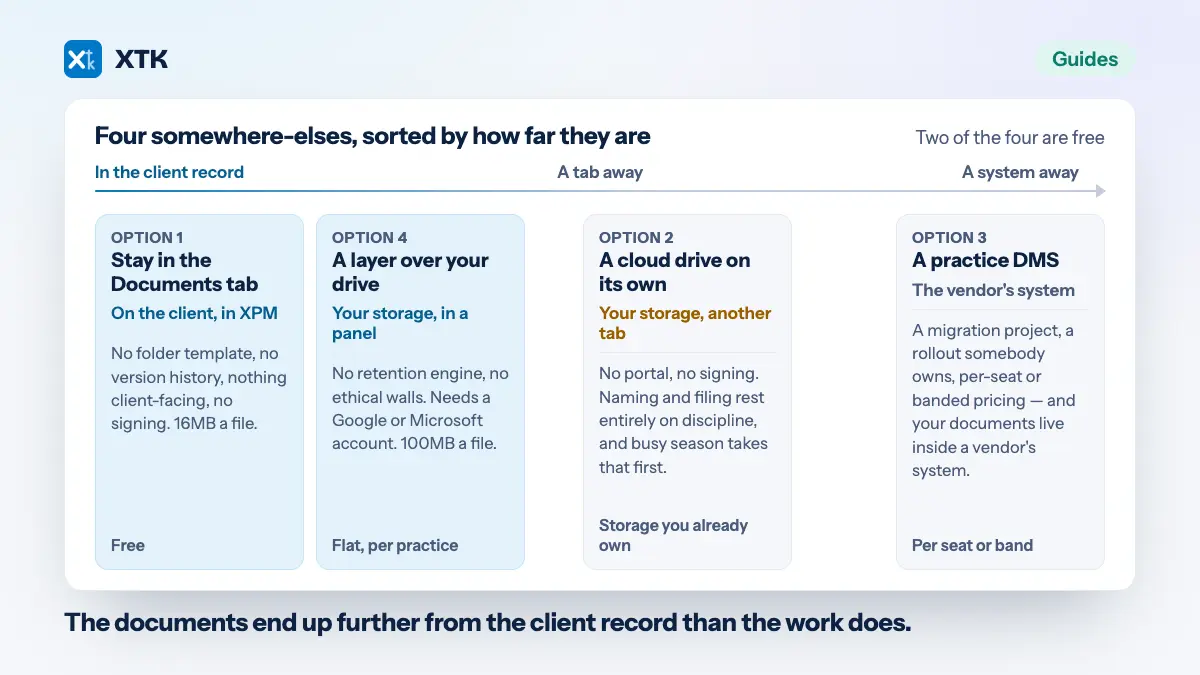
This article is about the layer between those two facts: the case for filing at job and quote level at all, and the four decisions that make it work or make it worse. It is deliberately not a tool review — which system to keep documents in is a different question, already answered on this blog, and every convention below can be run by hand in a bare Google Drive by a practice that installs nothing.
What can Practice Manager attach a document to?
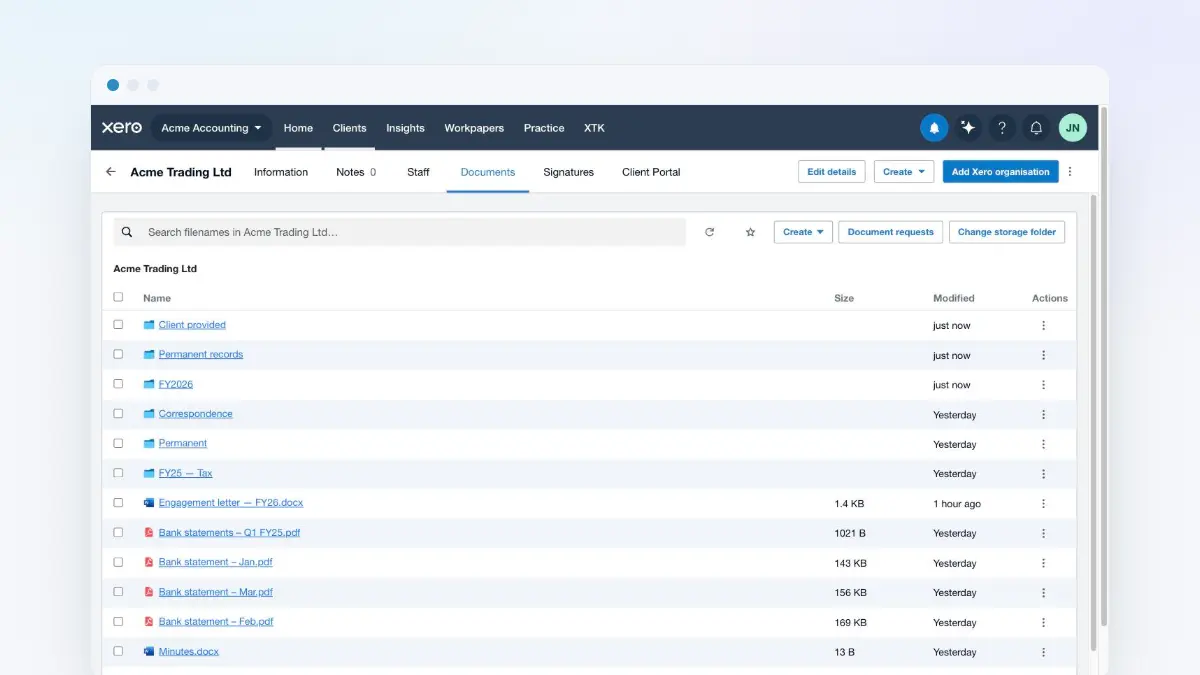
A client, a job or a quote — estimates included, since XPM treats those as quotes. Files go into Practice Manager itself, where any other user in your practice can see and download them, and you can group them into folders inside XPM. Uploads are capped at 16MB per file, as of August 2026.
That set of features has a real sweet spot, and it is worth naming before arguing past it: a signed form belonging to one particular job, a photograph attached to a note, a piece of correspondence that will only ever be looked for from the job it relates to. If that describes your document flow, the rest of this article is solving a problem you do not have.
Why isn't one folder per client enough?
Because a folder per client is sized for the client and the work is sized by the job. Do the arithmetic on a single compliance client: four to six jobs a year, eight to fifteen documents each. By year three that folder holds two hundred files. By year six it holds four hundred, and its only organising principle is whatever each person typed into the filename box in the moment.
Three specific things break, and none of them is tidiness.
- Search stops disambiguating. Nine files called Working papers.xlsx, six called Signed accounts.pdf, and the only way to tell them apart is the modified date — which is the date someone last opened the file, not the year the work belongs to.
- Nobody can tell one year from the next without opening files. FY24's bank statement and FY25's are two rows apart and identically named, and the person deciding which is which is usually the newest member of staff.
- The retention purge becomes an excavation. If nothing in the structure says which year a document belongs to, then destroying records at the end of their period means opening them one at a time, six years later, to find out. Most practices quietly decide not to, and keep everything forever instead.
The fix is not a tidy-up. A tidy-up loses to the next busy season. The fix is a layer, so that filing correctly is the path of least resistance rather than an act of discipline.
Should a job's documents live under the job or the client?
File against the record the work belongs to. A job owns the paperwork produced in doing it. A quote owns the paperwork produced in winning it. The client keeps only what outlives every job — and that last part is what stops a client folder turning into a folder of nothing but folders.
- The job owns working papers, checklists, the year's source records, the queries and their answers, the final signed accounts for that year.
- The quote owns the proposal, the fee schedule, the scope of work, and the version the client actually said yes to.
- The client keeps what is true across all of them: identity and due diligence evidence, the engagement letter, standing correspondence, permanent records such as the trust deed or the incorporation documents. This is the layer a sane client folder structure already describes, and it does not go away — the Jobs and Quotes layers sit beside it.
The reason to state the rule as a rule is that every alternative key looks reasonable and fails. Filing by the person who did the work loses the file when they leave. Filing by date loses it when the work spans a year end. Filing by the route you happened to browse is the worst of the three, and it is also the most common — which is the subject of the next two sections.
How should a job folder be named?
Number first, then the name. XPM gives every job a number, and that number is the only part of a job's identity that is unique across the practice and stable over time.
Acme Trading Ltd / Jobs / J000042 - FY25 Tax Return
A name-only convention hits three collisions, and they arrive in this order:
- The same job name across many clients. Two hundred clients have a job called FY25 Tax Return. Inside one client's folder that is survivable; the moment anything lists folders across clients, or anyone moves a folder by accident, it is not.
- The same name across years for one client. FY24 Tax Return and FY25 Tax Return are fine until someone renames one of them to Tax Return, which happens because the person renaming it is looking at one folder and not at the pair.
- A job renamed mid-engagement. The scope changes in March, somebody updates the job in XPM, and now the folder name and the job name disagree for the rest of the file's life. With the number in front, they still match on the part that matters.
The number also sorts. XPM numbers ascend, so a folder listing sorted by name is a folder listing in the order the work was taken on, which is very close to chronological and free.
Why does one job end up with two folders?
Because Practice Manager serves the same job at more than one web address. Arrive at a job from Job Manager and the address carries one identifier; arrive at the same job from the client's own Jobs tab and it carries another. Two addresses, one job — and both are pages a member of staff will genuinely be standing on when they file something.
This is the trap under any filing scheme that keys on the page rather than on the job, including a browser extension and including a person following a convention by hand. If the address is what decides the folder, the same job collects two folders, each holding half the engagement, and neither one obviously wrong. The fix is to key on the job's identity — number and name — and treat the address as nothing more than how you got here.
Where does a quote's paperwork go — under the quote, or under the job?
Under the client, in a Quotes layer that sits beside Jobs. Never inside the job, even though XPM will happily walk you between the two: a quote's page links back to a job, and a job's Financial tab lists the quotes raised against it. That link is navigation, not ownership.
The failure it prevents is specific. File a quote by the route the person took and the same quote's proposal lands in two different places depending on whether they reached it from Quote Manager or from the job — so the answer to “where is the signed proposal?” becomes “it depends who filed it”. One quote, one folder, under the client whose work it is.
One XPM quirk is worth knowing while you are here: quotes and estimates are the same record on the same screen, which XPM heads “Quotes and estimates”, and both get a Q number. If your practice says estimate where this article says quote, it is the same page and the same filing rule.
Should the folder exist before anyone puts a file in it?
This is the one genuine judgement call of the four, and both answers are defensible.
Create the folder when the job is saved and it is waiting for whoever files first, which matters if your team's instinct is to drag a file into Drive rather than to open a documents tab. This is the older convention and it is what a practice document management system typically does — SuiteFiles, for one, prompts you to create the folder as you save a new job (checked 13 August 2026).
The cost is empty folders, and the arithmetic is not small. Every quote you did not win gets one. Every job cancelled before it started gets one. Every job a recurring template generated gets one, whether or not anyone ever touched it — so a 300-client practice running quarterly jobs manufactures something over a thousand folders a year, most of them empty, all of them indistinguishable from the folders that matter. Six years of that is what makes a Drive unsearchable.
Create the folder the first time somebody opens the job's documents and the sprawl disappears, because a job nobody ever opened gets nothing. The cost is that the folder is not there in advance for anyone working outside the tab. Pick according to where your team actually files: if they live in XPM, create late; if they live in Drive, create early and accept the sprawl.
Four ways to file at job level
The convention above is independent of what you use to run it. Four approaches, honestly:
| Approach | Where files live | Folder per job | Cost shape |
|---|---|---|---|
| XPM Documents tab | In Practice Manager | Folders inside XPM | Included |
| Your Drive, by hand | Your own storage | If someone makes it | Storage only |
| Practice DMS | The vendor's system | Usually on save | Per user, banded |
| XTK | Your own storage | On first open | Flat, per practice |
By hand is a real option and it is underrated — a folder template, a naming rule written down, and a partner who enforces it will beat most software. It fails on the two-address problem and on nothing else, because a human being reads the job header rather than the URL. What it costs is attention, permanently. The full comparison of the systems themselves covers the vendor question in more detail than a four-column table can.
How XTK files a job and a quote
XTK puts its own Documents tab on every job and quote page in Practice Manager, in the position Xero's own Documents tab occupied, and files into your practice's own Google Drive, OneDrive or SharePoint. The two guides — job documents and quote documents — are the step-by-step versions. What is worth stating here is how it answers the four decisions above, because they were real decisions and it could have answered them differently.
- The folder is <client>/Jobs/<number> - <name>, with Quotes as a sibling of Jobs, so the name is composed from the job's number and name rather than scraped from whichever page you are on.
- Both of XPM's addresses for a job resolve to the same folder. That is the two-address problem handled once, centrally, rather than by asking staff to notice.
- A correctly named folder you already made by hand is adopted, contents and all, rather than migrated or duplicated. If two folders match the name, XTK stops and asks you to choose, and creates nothing while it waits.
- Nothing is created until somebody opens the tab. Jobs nobody opens get no folders — the late-creation side of the decision above.
- Rename the folder in Drive afterwards and XTK keeps pointing at it. It follows the folder, not the name.
- Moving, copying, merging and searching are all fenced inside the folder, so there is no path through a job's tab that files a document into a different client. Re-pointing is the single exception and it cannot leave the client's own folder.
- Uploads are 100MB per file, and go from your browser straight to Google or Microsoft.
A convention you can adopt this week
No software required. Inside each client's folder, three evergreen folders and two layers:
Acme Trading Ltd / — Engagement, Identity, Correspondence — Jobs/, Quotes/
- Name every job folder <job number> - <job name>, copied from the job header in XPM rather than typed from memory.
- Name every quote folder <quote number> - <quote name>, in Quotes, under the client — never inside the job it relates to.
- Put the year in the job name if your job names do not already carry it, because the year is what a retention purge reads.
- Write the rule down in one paragraph, and turn the inside of a job folder into a folder template so the structure arrives without anyone deciding it.
- Do not backfill six years of history. Start from the current year's jobs and let the old pile be the old pile — a convention that only applies going forward still fixes the problem within one busy season.
That is the whole thing, and the reason to write it down rather than buy it is that the convention is what makes any tool work. A practice that has never agreed where a job's paperwork goes will not have that decided for it by software; it will simply make the same disagreement faster.
Frequently asked questions
Can Xero Practice Manager store documents against a job?
Yes. XPM's Documents tab attaches files to a client, a job or a quote, stores them in Practice Manager itself, lets you group them into folders inside XPM, and makes them visible to other users in your practice. As of August 2026 the upload limit is 16MB per file. What it does not do is create a folder for the job in storage your practice owns, which is what a document management system or a layer over your own Drive adds.
How should we name job folders for a Xero practice?
Put the job number first, then the job name: J000042 - FY25 Tax Return. The number is the only part of a job's identity that is unique across the practice and stable when the job is renamed, and because XPM's job numbers ascend, sorting folders by name also sorts them roughly chronologically. A name-only convention collides three ways: the same job name across many clients, the same name across years for one client, and a job renamed mid-engagement.
Should a quote's documents be filed under the quote or under the job?
Under the client, in a Quotes layer beside Jobs — not inside the job. XPM links quotes and jobs together in both directions, but that link is navigation rather than ownership. If you file by the route the person took, the same quote's proposal ends up in two places depending on whether they arrived from Quote Manager or from the job's Financial tab, so the answer to where the signed proposal lives becomes a question about who filed it.
Do estimates get their own folder?
Yes, and in the same place as quotes. Practice Manager keeps quotes and estimates as one record on one screen, headed “Quotes and estimates”, and gives both a Q number, so an estimate files into the Quotes layer exactly as a quote does. If your practice uses the word estimate where this article says quote, it is the same page and the same rule.
Why does the same job sometimes get two document folders?
Because Practice Manager serves the same job at more than one web address, depending on whether you reached it from Job Manager or from the client's Jobs tab. Any filing scheme that keys on the page rather than on the job — software or human convention — can produce one folder per address, each holding half the engagement. Keying on the job's number and name instead makes both routes resolve to the same folder.
What happens to job folders if we stop paying for the tool that made them?
That depends entirely on whose storage they were in, which is why it belongs in the decision rather than after it. Folders created in your own Google Drive, OneDrive or SharePoint stay exactly where they are as ordinary folders, readable without the tool that created them. Folders created inside a vendor's own system leave with the subscription, and exporting them is a migration project rather than a setting — a distinction that matters most for the documents still inside a statutory retention period.