14 min read
Document management for a Xero practice: five options, honestly compared
By The XTK team · Product
There is no single best document management system for a Xero practice. There are five real options, and which one is right for you is decided by three things: where your client files live today, how many people need access and how part-time they are, and whether you have a compliance obligation that needs a formal system rather than a tidy one. This article prices all five, from each vendor's own pricing page, checked on 4 August 2026.
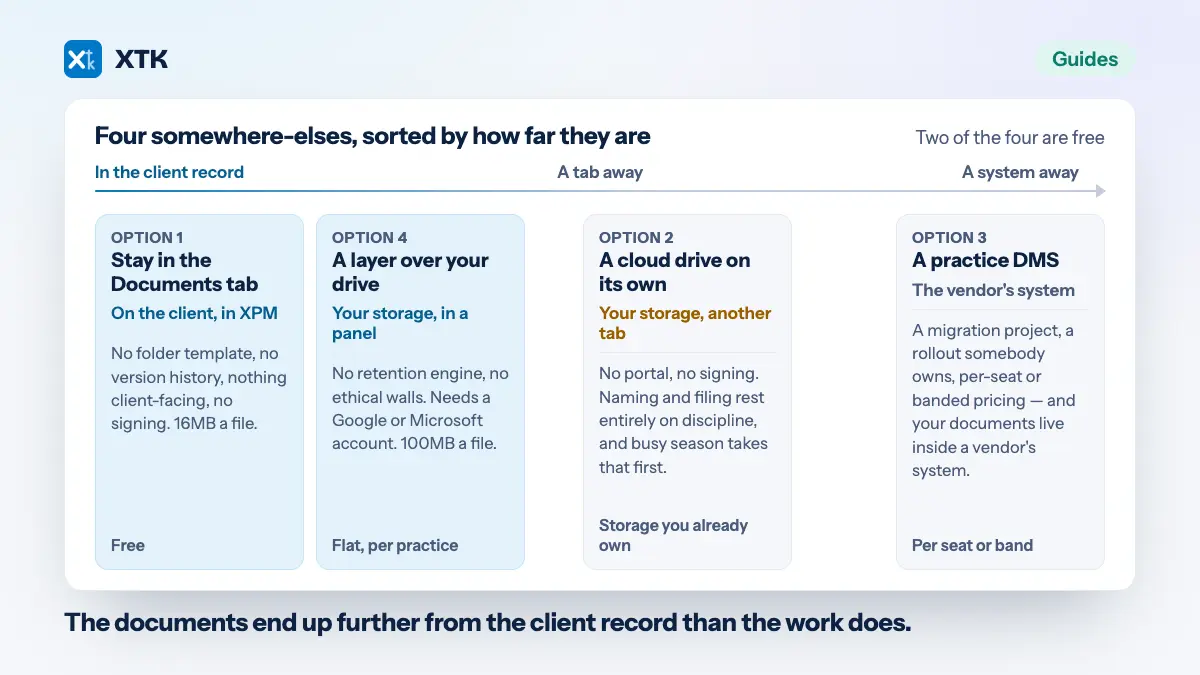
The five, sorted by the kind of firm they suit rather than by quality: Practice Manager's own Documents tab; a cloud drive on its own; a full practice document management system such as SuiteFiles or FYI; a practice platform such as Karbon or TaxDome that absorbs documents into a wider workflow suite; and an extension layer that adds the missing pieces to the drive you already own. What XPM does natively and where it stops is covered separately — this is the version with prices and vendor names in it.
Who wrote this, and what we sell
XTK makes one of the five options — the last one — so read this the way you would read any comparison written by a vendor. Two things make it useful anyway. Every competitor figure below was read from that vendor's own pricing page on 4 August 2026, with the page linked, and where a vendor publishes no price this article says so rather than repeating a third-party guess. Every “choose this if” is meant literally: three of the five are the better buy for some firms, and the sections below say which. If you want the top-funnel version without the pricing, start there instead.
Three questions that decide it for you
Answer these three before you look at a single feature list — they eliminate more options than feature lists ever will.
- Where do your client files live today, and can you move them? A firm with eight years of files in SharePoint is looking at a migration project that will dominate every other consideration — and most DMS vendors quote migration separately from the subscription, so it is a second invoice as well as a second project.
- How many people need access, and how part-time are they? Per-seat pricing is comfortable at five full-timers and punitive at fifteen mixed-mode staff. Count the bookkeeper who works Tuesdays, the offshore preparer and the three weeks of seasonal help, because whoever you decline to buy a seat for keeps working in email.
- Do you have a compliance obligation that needs a formal DMS? Enforced retention periods, ethical walls between engagement teams, audit-grade access logs. If you need those enforced by software rather than encouraged by policy, the lighter options are genuinely ruled out, and no price advantage changes that. Worth separating the two halves of that question first: how long you must keep client records is set by law, while whether software has to enforce it is set by your regulator and your appetite.
1. Practice Manager's own Documents tab
Free, already switched on, and enough for a genuinely small document flow. XPM attaches files to a client, a job or a quote, with uploads capped at 16MB per file and nothing client-facing at all.
What it is genuinely good at is proximity: the file sits on the job it belongs to, which every other option has to work to recreate. What it costs you elsewhere is everything around that — no folder template, no version history, no portal, no upload link, no signing. Anything a client has to see or send travels by email and gets filed by hand, if at all.
Choose this if you are a sole practitioner or a two-person firm, your documents are small, and no client ever needs to log in or upload anything. That is a real firm and it should not be sold anything.
2. A cloud drive on its own
A few dollars per user per month for storage you almost certainly already pay for inside Google Workspace or Microsoft 365 — and this is where most XPM practices actually are. One folder per client, named to match XPM, and nothing to migrate.
Good at ownership and cost: you hold everything, there is no vendor to leave, and your provider's own version history applies. What it costs you elsewhere is distance. The drive is a separate tab from the client record, so structure rests entirely on discipline, sharing means provider link-sharing decided in a hurry, and there is no portal, no upload link and no signing.
Choose this if you are small, genuinely disciplined about naming, and your clients are content with email. Plenty of good practices run this way for years.
3. A practice DMS: SuiteFiles or FYI
Purpose-built filing for professional firms, with portals, signing, email filing and audit trails. This is the category to shop in if compliance is driving the decision. Both publish real prices, and their pricing shapes are opposites.
SuiteFiles prices per firm, in user bands. As of 4 August 2026 its pricing page lists Super Suite from $225 a month billed monthly or from $210 billed annually, including up to five users and adding unlimited document signing and a client portal, and Semi-Suite from $250 monthly or from $230 annually, including up to ten users. “Super Suite for Enterprise” is price on application. The figures carry a dollar sign but no currency code, and SuiteFiles runs a separate US pricing page, so confirm the currency for your region.
FYI prices per seat. As of 4 August 2026 its pricing page lists Intermediate at $30, Pro at $50 and Elite at $70 per user per month, and states plainly that all prices are in AUD excluding GST, that a minimum of five users is required, and that migration, onboarding and consulting are quoted separately. FYI's XPM integration covers client data, jobs and time.
A third data point: Virtual Cabinet publishes from £35 per user per month, or from $67 in AUD, on its own pricing page as of 4 August 2026, with a volume discount above ten users; its cloud product Workiro is quote-only on the same page. Quote-only is not a criticism, but it is worth knowing.
What these do better than XTK, without qualification: enforced records management and retention, deeper audit trails, email filed into the client file, access control of the kind firms with ethical-wall obligations need, several more years of maturity, and an implementation team that has migrated hundreds of practices. SuiteFiles also reaches back into Practice Manager — match the SuiteFiles client folder name to the XPM client name and XPM's own client document tab reads the files out of SuiteFiles.
What it costs you elsewhere: a migration project, a rollout somebody has to own, a separate invoice for that migration, and your documents now living inside a vendor's system. Choose this if you are ten or more people, or you have retention obligations that need enforcing rather than encouraging, and you have someone to own the rollout. Some readers of this article should buy SuiteFiles or FYI, and this is the paragraph that says so.
4. A practice platform: Karbon or TaxDome
Here you are buying workflow, jobs and client communication, with documents included rather than being the point. Karbon publishes per-user pricing: as of 4 August 2026 its pricing page lists Team at US$59 per user per month billed annually (US$79 billed monthly) and Business at US$89 billed annually (US$99 monthly), with Enterprise on custom pricing. Document management and a client portal are listed on every plan.
TaxDome belongs in this category too, but its pricing page could not be retrieved on 4 August 2026, so this article quotes no TaxDome figure at all. Check it directly rather than trusting any number a comparison article gives you, including this one.
What a platform is genuinely good at is being one system for the whole practice, a real prize if your work currently spans four. What it costs you elsewhere shows up only if you are staying on XPM: you end up with two systems that both believe they own the client. Karbon's XPM integration is a two-way contact and client sync — genuine and well documented, but it syncs contacts, not jobs, so the workflow overlap stays. Choose this if you are re-platforming the whole practice anyway and are willing to move off XPM's workflow, rather than bolting a second workflow beside it.
5. A layer over the drive you already own
The newest shape: leave the files in your own Google Drive, OneDrive or SharePoint and add the missing pieces — folder-per-client structure, portal, document requests, signing, templates — inside the Practice Manager tab. This is the category XTK is in, so treat what follows as disclosure rather than analysis. XTK is $59 USD a month for the whole practice, after a 30-day trial that takes no card, with no tiers and no per-seat maths.
Good at: nothing moves, so there is no migration and no new home for your documents; the bill does not change when you hire; and the panel opens against whichever client is already open in XPM, so the drive stops being a destination people have to remember. Connecting storage adopts an existing client folder by name rather than duplicating it.
What it costs you elsewhere, stated plainly: XTK is younger and narrower than a full DMS. There is no records-retention engine and no ethical walls. It needs you to have Google Drive, OneDrive or SharePoint — SharePoint requires a work or school account — and it connects one storage provider per practice, not several. The working limits are real too: 100MB per uploaded file, document templates as .docx only up to 25MB, PDF merge up to 50 files and 100MB in total, zip download refuses folders, and bulk move or copy tops out at 200 items and is all-or-nothing.
Choose this if you are a small-to-mid Xero-centric firm already living in Google Drive or Microsoft 365, you want the portal, the upload links and the signing closed off without moving anything, and nobody is asking you to enforce retention in software.
The table compares the five as categories rather than products — the choice you make first.
| Compared on | XPM tab | Drive alone | Practice DMS | Practice platform | Layer over drive |
|---|---|---|---|---|---|
| Where files live | In XPM | Your storage | Vendor's system | Vendor's system | Your storage |
| Works inside XPM | Native | No | Via XPM's tab | Contact sync | Yes, a panel |
| Client portal | None | Link sharing | Yes | Yes | Yes |
| E-signatures included | None | None | Usually | Usually | Yes |
| Document requests | None | None | Usually | Usually | Yes |
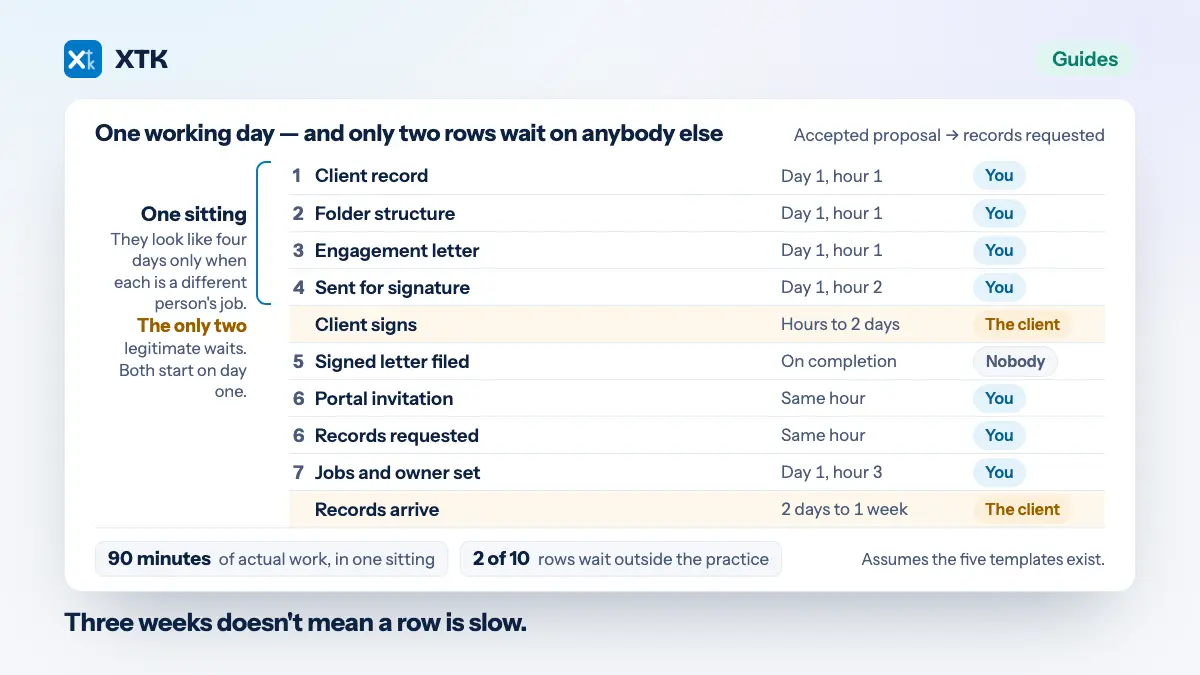
| Template automation | None | By hand | Yes, mature | Yes | From XPM data |
| Retention policies | None | Provider's | Enforced | Varies | None |
| Migration required | None | None | Yes, a project | Yes, a project | None |
| Pricing model | Included | Storage you own | Per firm band | Per user | Flat per practice |
| Indicative price | Free | A few dollars | From $210/mo | From $59/user | $59/mo flat |
| If you leave | Stays in XPM | Nothing changes | Export request | Export request | Stays in place |
Two rows deserve a footnote. “E-signatures included” says nothing about whether a signature stands up where you practise, which is a separate question with a clearer answer than most firms expect. And “document requests” is the row that decides whether taking on a new client is one motion or five emails, which is where the time actually goes.
The number most comparisons skip: cost per person, at your headcount
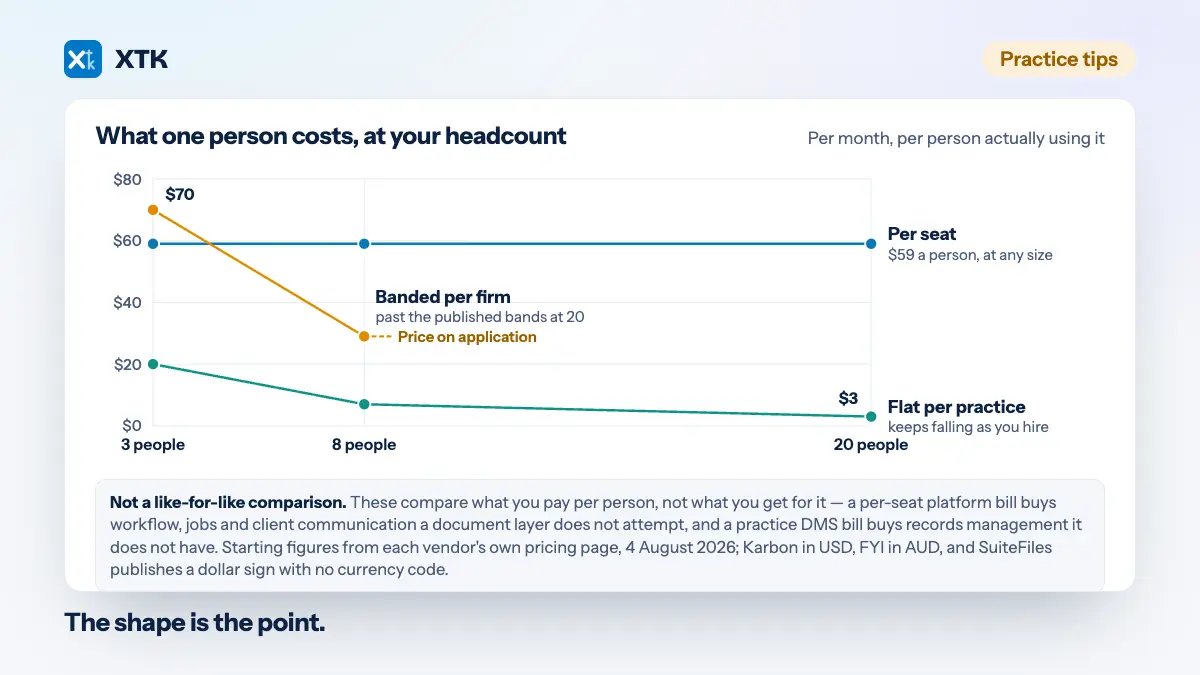
The same firm at 3, 8 and 20 people pays wildly different amounts under the three pricing shapes, and that divergence is most of the decision. The figures below are indicative, built from the verified prices above — starting prices, not quotes.
Per seat, at Karbon's Team rate of US$59 per user per month billed annually: 3 people is about $177 a month, 8 is about $472, and 20 is about $1,180. On the Business rate of US$89, 20 people is about $1,780. Per seat in AUD, at FYI's Pro rate of $50 per user per month, a three-person firm still pays for five because five is the published minimum — about $250 a month, or roughly $83 per person actually using it.
Banded per firm, at SuiteFiles' published bands: a 3-person firm pays the five-user band, from about $210 a month billed annually, which is about $70 a person. An 8-person firm pays the ten-user band, from about $230, which is about $29 a person. At 20 people you are past both published bands and into price on application.
Flat per practice, at XTK's $59 a month: 3 people is about $20 a person, 8 is about $7, and 20 is about $3. The shape is the point. Per-seat cost per person is flat by definition, banded cost per person falls in steps and then stops, and flat cost per person keeps falling for as long as you keep hiring.
The second effect matters more than the first. Per-seat pricing does not only cost more — it changes behaviour, because it turns every marginal person into a purchasing decision. The Tuesday bookkeeper, the offshore preparer and the seasonal help are precisely the people a firm declines to buy seats for, and precisely the people who then keep filing in email. That is how shadow filing starts, and no feature in the system you did buy will fix it. FYI's published five-user minimum is evidence that vendors know this pinch is real.
What happens to your documents if you leave
Ask this of every option, including ours. It is not a prediction that you will leave — it is a test of how much of your filing system belongs to you.
With a DMS or a practice platform, your documents live in the vendor's system, so leaving means an export: in their structure, in their format, on their timetable. That is a trade rather than a flaw — a purpose-built repository is exactly what you were paying for — but it is a project, and it is worth asking a salesperson what the export contains and how long it takes to arrive before you sign anything.
With XPM's own tab, the files stay in XPM for as long as you stay on XPM. With a drive on its own, nothing happens at all. With a layer over your drive, nothing happens either: disconnecting XTK removes its access and leaves every folder and file exactly where it was, as ordinary files in storage you already own. A lapsed trial or a cancelled subscription puts the practice into read-only rather than taking anything away, and closing the account deletes XTK's own records without touching your drive. What XTK does hold, and what streams through it, is set out in how XTK handles your data and in the privacy policy.
So which one should you buy?
Back to the three questions, one sentence each. If your files already live in Google Drive, OneDrive or SharePoint and you cannot face a migration, your honest shortlist is a drive on its own or a layer over it. If your headcount includes part-timers, offshore staff or seasonal help, price every option per person at your real headcount rather than your full-time equivalent, because the people you leave off the licence decide whether the system works. And if a regulator or a professional body expects retention and access to be enforced by software rather than by policy, buy a practice DMS — SuiteFiles and FYI both publish their prices, which is more than much of this market does.
If XTK is on that shortlist, the pricing page says what the $59 covers, and installing it against one client takes about ten minutes — getting set up is a short guide rather than an implementation.
Frequently asked questions
Do I need a document management system, or is Google Drive enough?
Google Drive is enough if you are small, disciplined about folder naming, and no client needs to log in or upload anything. You need a document management system once structure has to survive staff turnover, or a regulator expects retention and access to be enforced by software rather than encouraged by policy. Between those two points, a layer over your own drive covers most of the gap.
What is the cheapest client portal for a small accounting practice?
As of 4 August 2026, the cheapest option is whichever tool prices per practice rather than per user, because portals are almost never sold alone. SuiteFiles includes a portal from about $210 a month for up to five users, Karbon includes one from US$59 per user per month billed annually, and XTK includes one at $59 USD a month for the whole practice. Check each vendor's page for current figures.
Can I use XPM and a separate DMS together?
Yes, and most firms do. SuiteFiles, FYI and Karbon all integrate with Xero Practice Manager to some degree — SuiteFiles surfaces its files in XPM's client document tab when folder names match, FYI syncs client data, jobs and time, and Karbon syncs contacts two ways. The risk is workflow overlap: a platform that also runs jobs will compete with XPM for ownership of the client.
Does switching mean migrating years of client files?
It depends entirely on which option you choose. Moving to a practice DMS or a platform means a migration project, usually quoted separately from the subscription. Staying on your own cloud storage, with or without a layer on top of it, means no migration at all, because the files never move — XTK adopts an existing client folder by name rather than creating a duplicate beside it.
Is a Chrome extension secure enough for client data?
It depends on what the extension does with your files, so ask that specifically. XTK uses no Xero OAuth app and holds no Xero credentials, and uploads go from your browser straight to Google or Microsoft. But downloads, zip downloads, PDF merges, template generation and signature flattening stream bytes through XTK's backend in flight, without being written to disk or stored, and Convert to PDF hands that one file to CloudConvert, a third party. Read the data guide before deciding.