11 min read
How to stop chasing clients for documents: a five-step request system
By The XTK team · Product
Chasing clients for documents is a design problem, not a motivation problem. Requests that stall share three traits: they name categories instead of items (“your 2025 records”), they leave the destination to the client, and they never show the client what is still missing. Fix those three and most of the follow-up disappears. What follows is the system, two request lists you can copy, and the part no system fixes.
None of it requires software. The five steps work in a Word document and an email, and are worth doing that way before you buy anything: a tool that automates a badly written request only sends the ambiguity faster.
Why clients stall on document requests, and why it isn't laziness
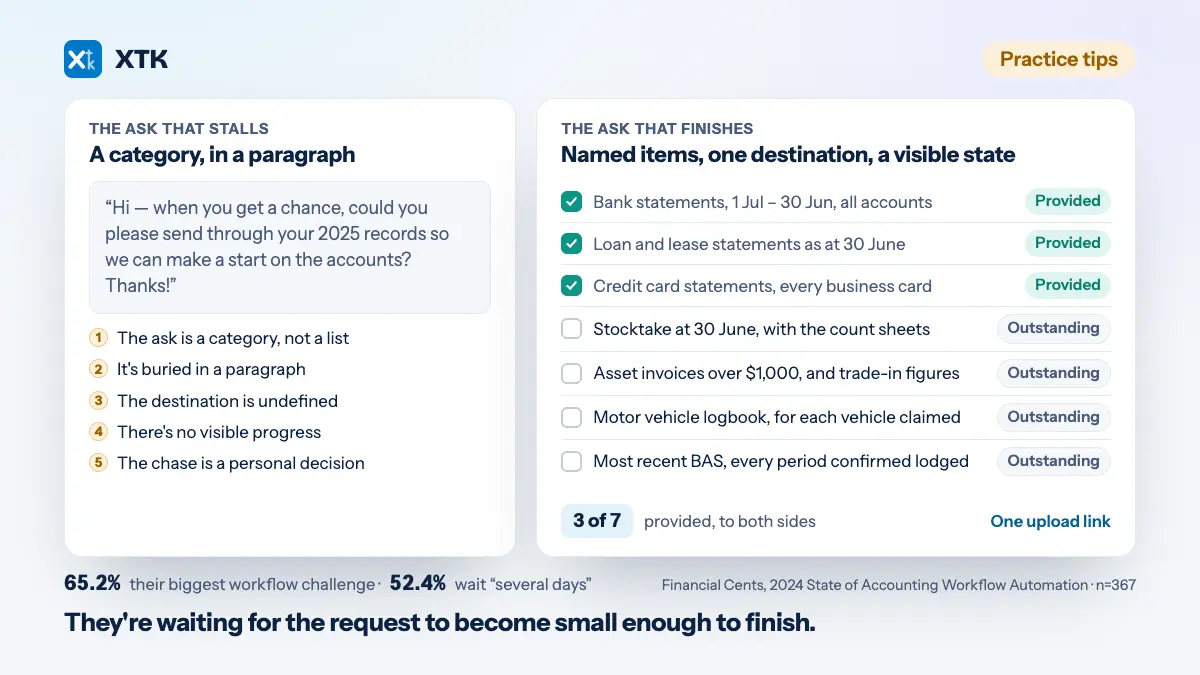
Clients stall because the request doesn't tell them what finished looks like. Someone asked for “your 2025 records” has to do your job before they can do theirs: decide what counts, decide what's enough, decide where to put it. Given an unbounded task and no finish line, most people postpone. Five failures cause almost all of it, and each has its fix in the wording rather than the tone of the follow-up.
- The ask is a category, not a list. “Bank statements” is a research project. “2025 bank statements, 1 July to 30 June, every account” is an instruction.
- The ask is buried in a paragraph. Nobody reading email on a phone works through prose looking for their obligations. Put the items on separate lines so there is something to tick off.
- The destination is undefined. If you don't say where, the answer is a reply with attachments — and the file now sits in an inbox, where somebody has to file it before it counts as received.
- There is no visible progress. A client who has sent four of seven things cannot tell which three are outstanding, so they wait to be told.
- The chase is a personal decision. Somebody has to notice, decide to nag and find the words, so it happens late, inconsistently, and to the politest clients last.
This is not a niche complaint. In Financial Cents' 2024 State of Accounting Workflow Automation report — 367 accounting and bookkeeping professionals surveyed between November 2023 and January 2024 — “getting info and documents from clients carried the crown” as the biggest workflow challenge, named by 65.2% of respondents, and 52.4% said documents arrived “after several days”. So the problem is close to universal, which means it is not your client list, and it is measured in days, which makes it a cycle time you can shorten.
A client who postpones your request isn't refusing. They are waiting for the request to become small enough to finish.
The five-step system for collecting client documents
Write the request as a list of items, standardise the list per job type, give exactly one destination, make the state visible to both sides, and make the follow-up a routine rather than a decision. Each step removes a specific reason a request stalls, and they compound: the standardised list is what makes the other four cheap enough to do every time, including on the jobs you are already late on.
1. Write the request as a list of items, not a sentence
One line per document, each specific enough that the client cannot get it wrong. The test: could a reasonable person hand you something and then be told it was the wrong thing? If so, the item is underspecified. “Bank statements” fails. “2025 bank statements, 1 July to 30 June, all accounts, PDFs from the bank rather than screenshots” passes. Give the period as dates, name the format where format matters, and say how many you expect.
2. Standardise the list per job type, not per client
Build the list once for each recurring engagement — annual accounts, individual tax return, a BAS or VAT return, onboarding a new client — and reuse it. This is the step that compounds, and it is why ad-hoc requests never improve: a list written from scratch under deadline pressure is always the vague version. A standard list also gets better on its own, because every “actually, we also need…” becomes a permanent line rather than a lesson one person privately learns.
3. Give exactly one destination, and make it a link
One upload link per request, landing in the client's own folder. No “reply with attachments”, no “or drop it in Dropbox, whatever's easiest”. Every alternative you offer is a decision the client has to make and another place your team has to look. It also settles who does the filing: a file arriving through a link you control is already in the right folder. If you offer email as a fallback, you have chosen email.
4. Make the state visible to both sides
Every item should read outstanding or provided, to you and to the client, on the same screen. This removes more email than any other single change, because most of that email is the two sides asking each other for a status — “did you get the statements?”, “sorry, which ones are you waiting on?”. A visible count changes behaviour too: three of seven provided is an unfinished task, and people finish unfinished tasks.
5. Make the follow-up a routine, not a decision
Decide the cadence before you send anything — a nudge at day three, another at day seven, a phone call at day fourteen — and put it somewhere that isn't one person's memory. A recurring calendar block twice a week, in which somebody opens the list of open requests and works down it, is the entire mechanism. It is deliberately boring. Nobody has to decide to chase, so nobody has to feel rude, and the politest clients stop being chased last.
Be clear-eyed about which tools automate that step. Plenty of document-collection products send reminder sequences on your behalf. XTK does not: it has no scheduler and no automatic reminders of any kind, so following up is an action somebody takes. If unattended reminder sequences are what you are shopping for, buy a product that has them.
A worked annual accounts request list you can copy
An annual accounts list written to the standard above. It reads Australian — swap the balance date and the tax references for your jurisdiction — and it assumes the bookkeeping is already in Xero, so it asks only for what Xero cannot tell you.
- Bank statements for the year ended 30 June 2026 — every business account, including any closed during the year, as PDFs from the bank rather than screenshots.
- Loan, lease and hire purchase statements as at 30 June 2026, showing each closing balance and the interest charged for the year.
- Credit card statements for the full year, every card used for business — including personal cards used for business purchases.
- The signed contract or schedule for any new loan, lease or hire purchase taken out during the year.
- Stocktake figure at 30 June 2026, with the count sheets behind it.
- Invoices for every asset bought or sold during the year over $1,000, plus the sale or trade-in figure for anything disposed of.
- Motor vehicle logbook for each vehicle claimed, or written confirmation that last year's logbook still holds.
- Home office details, if you claim it: work floor area, total floor area, and the year's rates, interest, insurance and power bills.
- Confirmation that every BAS period for the year has been lodged, and a copy of the most recent one.
- Payroll: the finalised single touch payroll declaration, and any wages paid to family members including hours worked.
- Anything you paid for personally on the business's behalf and haven't been reimbursed for — date, amount, purpose.
- Details of any dividends, trust distributions or loans between related entities during the year.
Twelve items, no prose, nothing to interpret, and every line survives being read on a phone. The thresholds and dates are one practice's conventions rather than tax rules, so set them to what your firm uses. Note what the list never does: explain why you need each thing. Explanations belong in the covering message, because the item names are what the client scans.
A request list for an individual tax return
Same discipline, shorter list — a salaried individual with an investment property, which is a large share of most practices' individual work.
- Income statement or payment summary for the year ended 30 June 2026, from every employer.
- Annual interest summary from every bank account that earned interest.
- Dividend statements for each holding, or the annual tax statement from your broker or share registry.
- Annual tax statements for any managed funds or trusts you hold units in.
- Rental property: the annual statement from your agent, or a rent received summary if you manage it yourself.
- Rental property expenses: council rates, water, insurance, body corporate, repairs, and the loan interest statement.
- Depreciation schedule for the rental property — last year's, or the quantity surveyor's report if this is the first year.
- Private health insurance annual tax statement.
- Work-related expenses: a list with dates, amounts and what each was for, plus the receipts you have.
- Receipts for donations to registered charities.
- Anything sold during the year — shares, crypto or property: the purchase contract, the sale contract, both dates.
- Last year's tax return, if another firm prepared it.
What to do about the clients who still don't respond
No request design fixes everyone. Roughly one client in ten needs escalating whatever you send, so decide the tiers in advance — the point is that the escalation isn't a mood.
- Put a real deadline in the request itself, as a date rather than “as soon as possible”. The deadline clients act on is the one with a reason attached: the date you need it by to lodge on time, not the statutory date.
- After the second nudge, phone them. Voice beats email for the last ten per cent, and a two-minute call usually surfaces the real blocker — they can't find the bank login, they think they already sent it, or item four doesn't exist and nobody told you.
- State the consequence, tied to a real constraint. “We can't lodge by 15 May without item 4, and the penalty after that is the tax office's rather than ours” is information. “Please respond urgently” is noise.
- For the chronic ones, change the commercial arrangement rather than the wording. Price the extra work, or move them to a later slot so their lateness costs them their preferred date instead of your weekend. A client who takes six weeks to send bank statements every year isn't a communication problem — that is what they cost.
One thing worth removing rather than escalating: the apology. A practice that opens its third follow-up with “so sorry to chase again” has taught the client that chasing is the practice's problem to feel bad about. It isn't.
Where the uploaded files should land
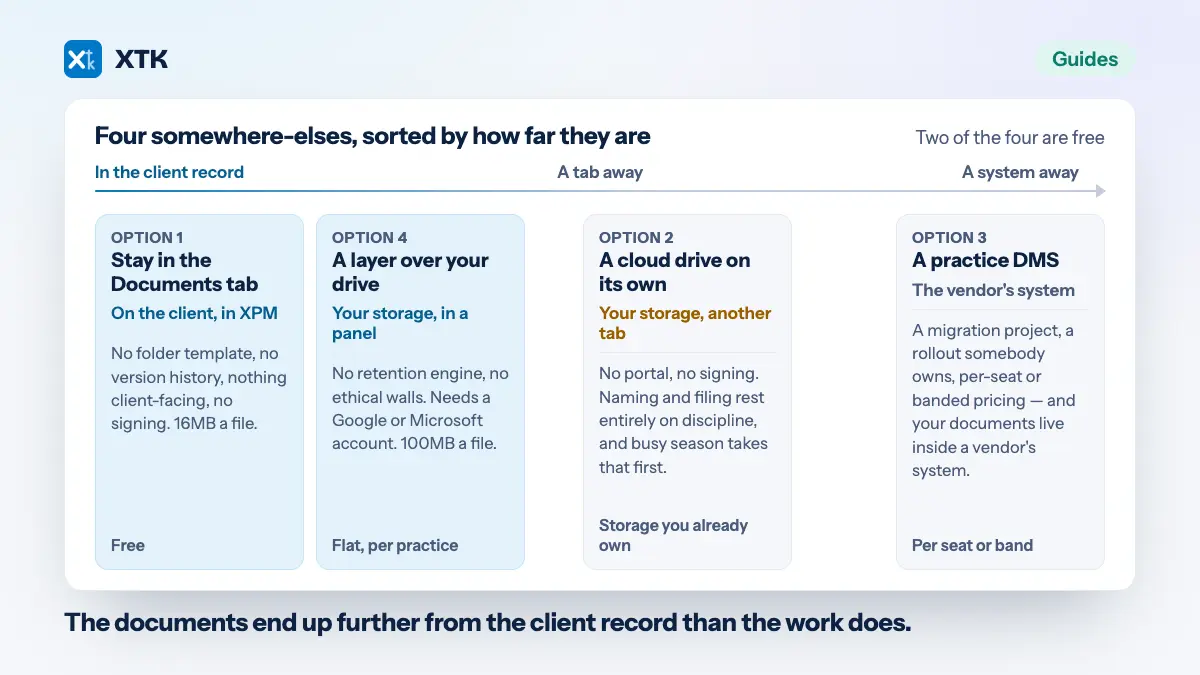
Straight into the client's folder in your practice's own storage, named so the next person recognises it without opening it. Files that arrive in an inbox get filed twice or not at all, and twice is worse — two versions, and no way to know which one the reviewer read. What that structure should look like is worth settling once, and where the folder itself should live is a decision with four honest answers.
How XTK handles document requests
In XTK, a document request is a checklist you send from the client you already have open in Xero Practice Manager. You list the items, XTK emails one link, and the client uploads against each line — no account, no password, nothing to install. Because the panel opens inside XPM, the recipient's email arrives prefilled from the client's record, so nothing is re-keyed.
Files travel from the client's browser into that client's folder in your own Google Drive, OneDrive or SharePoint, and each item flips from outstanding to provided as they land. One detail nothing else documents: a file uploaded against a requested item is renamed in your storage to that item's name, so “IMG_4471.HEIC” against “Motor vehicle logbook” becomes “Motor vehicle logbook.HEIC”. Precise item names buy a tidy folder as well as a clear request — and a folder you can still audit years later, when the retention period on those records is the only reason you are opening it. Extras keep their original names, and the link expires after 30 days.
Filter that client's request list to Sent and In progress and you have the working set for the calendar block in step five. Notifications tell you when a client submits and when a request expires, request wording lives in email templates, and the mail sends from your practice's shared Gmail or Outlook.
Two caveats before you decide anything. Client uploads pass from the browser to Google or Microsoft directly, but downloads, PDF merges, template generation and signature flattening stream through XTK's backend in flight — nothing written to disk or kept — and “Convert to PDF” hands that one file to CloudConvert, an external service; the full account of what moves where is a guide of its own. XTK is one flat $59 a month for the whole practice after a 30-day trial, and installs from the Chrome Web Store or Firefox Add-ons.
The one number worth tracking
Measure the days from request sent to request complete, take the median, and track it across one busy season. It is the only number that tells you whether any of this worked, and it doesn't care how polite the follow-ups were. Practices that measure it are surprised twice: by how long the median is, and by how much of it sits between “sent” and “first file” — precisely the part the wording controls. If it doesn't move, look at the request again before you look at the clients.