15 min read
Four collections a year, not one: client documents under MTD for Income Tax
By The XTK team · Product
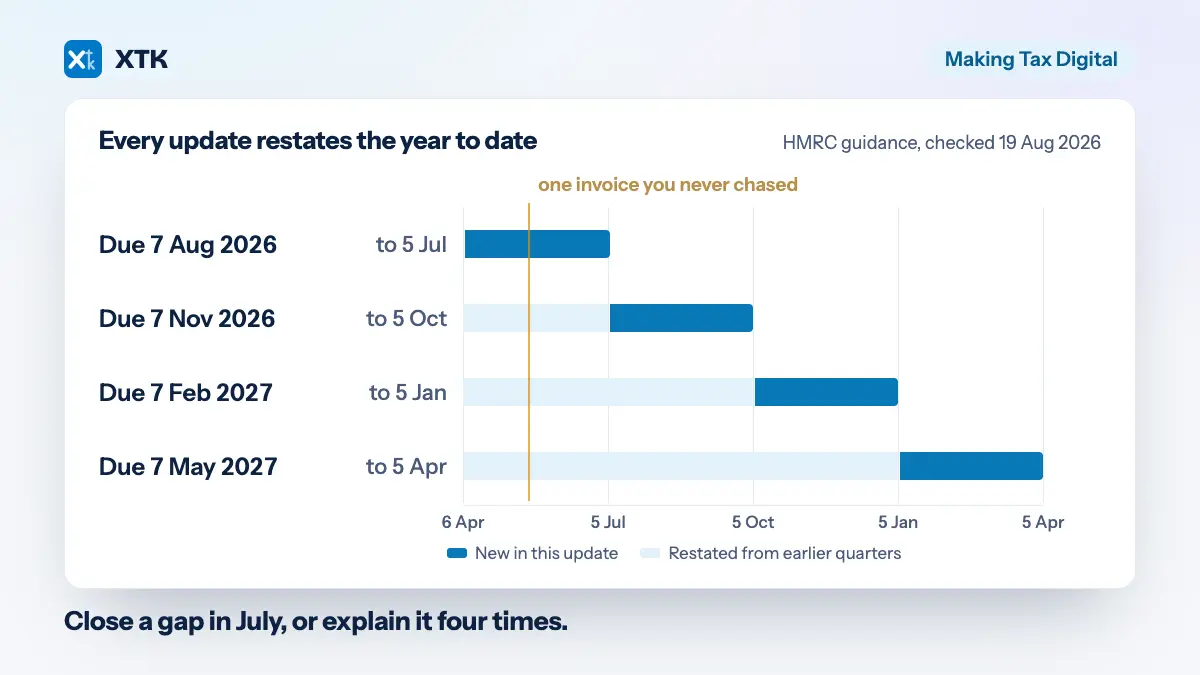
Making Tax Digital did not change which documents you need from a client. It changed how often you need them, and it made an unclosed gap follow you through the year. A quarterly update carries category totals and nothing else — no attachments, no uploads — but the obligation to hold the bank statements and invoices behind those totals is untouched, and each update restates the whole year to date.
So the same evidence now underpins five filings instead of one. This article is about what that does to a collection process built for January, and what to put in its place before the next deadline on 7 November 2026. Almost all of it works with no software you do not already have.
What actually changed on 6 April 2026?
Sole traders and landlords above a threshold now send four quarterly updates and a tax return, in place of one return. It became mandatory on 6 April 2026 for anyone with qualifying income over £50,000, and HMRC's guidance defines qualifying income more widely than most first readings assume: “your total turnover from self-employment and property income”, being “the total amount before expenses, based on the tax return you submitted in the previous tax year”.
Two things follow from that definition, and both are useful. It is turnover, not profit, so a landlord with £55,000 of rent and £40,000 of costs is in scope on a £15,000 profit. And it comes from the return you have already filed, which means the in-scope list is not a forecast — it is a query you can run against work you finished last season.
The threshold then steps down. Qualifying income over £30,000 in the 2025 to 2026 tax year brings a client in from 6 April 2027, and over £20,000 in 2026 to 2027 brings them in from 6 April 2028. Each step is a larger cohort than the one before it.
The four deadlines are fixed dates rather than a rolling window.
| Update period | Deadline | What it covers |
|---|---|---|
| 6 Apr – 5 Jul 2026 | 7 Aug 2026 | First quarter |
| 6 Apr – 5 Oct 2026 | 7 Nov 2026 | Two quarters, restated |
| 6 Apr – 5 Jan 2027 | 7 Feb 2027 | Three quarters, restated |
| 6 Apr – 5 Apr 2027 | 7 May 2027 | The full year, restated |
Does a quarterly update need documents, or just numbers?
Just numbers. A quarterly update contains “totals for each income and expense category you've used for your self-employment and property income”, and that is the whole of it. Nothing is attached and nothing is uploaded to HMRC. If you were braced to start sending receipts four times a year, the guidance on quarterly updates sets out what an update carries, and receipts are not in it.
The counterweight is in the same guidance, and it is the sentence this article is built on. On creating digital records, HMRC is explicit: “You still need to keep original records or supporting documents (or copies of them) that you have used to prepare your tax return, such as bank statements and invoices.” The digital record itself is three fields — the amount, the date, and the category. The evidence behind it stays exactly where it was, which is your problem rather than HMRC's.
Making Tax Digital digitised the summary, not the evidence. The shoebox is still a shoebox — it just has four deadlines now.
And it has to survive. HMRC's requirement is to “keep your digital records for at least 5 years after the 31 January submission deadline for a tax year”, so a bank statement collected in July 2026 for the first quarter of 2026 to 2027 is still a record you may be asked to produce in early 2033. That is a long time for something that arrived as an email attachment, and it is the retention question rather than a filing preference.
Why does the cumulative rule change how you chase?
Because a gap does not stay in the quarter it arrived in. HMRC's wording is that “each time you send a quarterly update it will cover from the start of the tax year to the end of the update period, not just the previous three months”. Every update restates everything before it.
Work that through with one missing bank statement. Under annual Self Assessment, a statement you cannot get in July delays one filing, and the January clean-up absorbs it along with everything else. That was not laziness — it was efficient batching. One pass at the client, one set of queries, one review, once a year.
Under cumulative quarterly updates, the same missing statement is missing again in November, again in February, and again in May. You either carry a figure you know to be wrong through three more submissions, or you correct it three more times. Either way you touch that client's paperwork four times instead of once, and the correction has to be explained on each occasion.
That is the real change, and it is not the filing. Deferring collection used to be the cheapest available option. It is now the most expensive one, which inverts an instinct every busy season is built around.
How many clients actually filed on time?
Fewer than half. HMRC published the outcome on 12 August 2026: more than 436,000 sole traders and landlords sent their first quarterly update, and over 570,000 had signed up to the service. Three weeks earlier it had put the number of people in scope at more than 864,000.
The arithmetic on those figures is uncomfortable. Roughly 428,000 people who should have filed by 7 August did not, and roughly 294,000 have not signed up at all. HMRC states each figure as a floor rather than a count, so treat all three as approximate — but the shape does not depend on the rounding, and a good share of those people are somebody's clients.
Why is 2026 to 2027 the year to fix this?
Two reasons, both HMRC's own. The first is that this year's mistakes are cheap: “no penalty points will be issued for late quarterly updates during the 2026 to 2027 tax year”, though penalties still apply for late tax returns and late payments. A collection process that fails this year costs you time. The same failure next year costs your client penalty points.
The second is that the population is about to grow without anyone opting in. From September 2026, HMRC begins signing up customers who should be using Making Tax Digital for the 2026 to 2027 tax year but have not yet done so. If you have been treating the un-signed-up as a problem for later, later starts next month.
There is a third reason that belongs to you rather than to HMRC. The £30,000 cohort starts on 6 April 2027, and it is identifiable from the 2025 to 2026 returns you will file between now and 31 January 2027. You are about to handle every document you need to build next year's in-scope list. Building it while the return is open costs minutes; rebuilding it in March costs a week.
What does a quarterly collection cycle look like?
Four dated windows, one standing request list per client type, one internal cut-off per window, and one destination decided in advance. Set up once, run four times a year, changed as little as possible.
The thing that makes a quarterly cycle survivable is that it is identical every quarter. Annual collection could afford to be bespoke — you had eleven months of slack and one deadline. A quarterly cycle has about four and a half weeks between the period closing and the update falling due, four times a year, and anything bespoke inside that window will not be done the same way twice.
- The window opens when the period closes, not when the quarter opens. For the second quarter of 2026 to 2027 that is 6 October, not 6 July.
- The internal cut-off is your date, and it is not the statutory one. If the update is due 7 November, the cut-off you tell the client is late October, and the days between are review time rather than slack you have already spent.
- The request is the same list every quarter, so a client learns the shape of it by the second one and stops asking what you want.
- The destination is decided before the first request, so nobody is inventing a folder at the point of filing.
What goes on the standing quarterly request list?
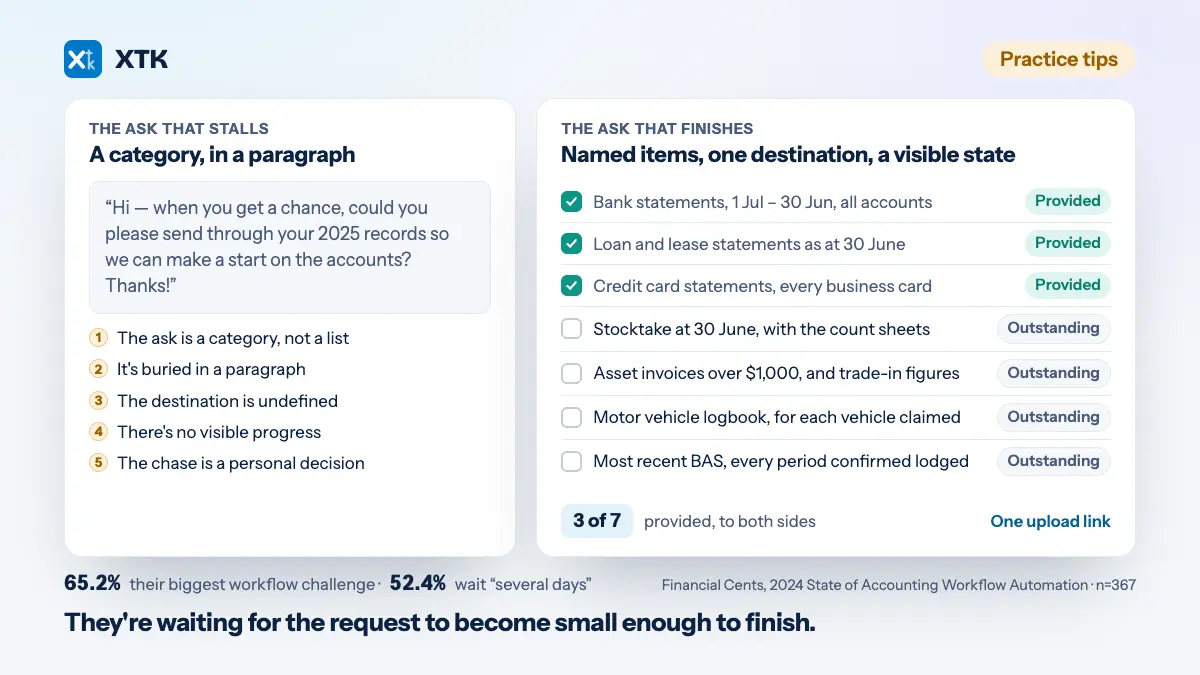
Two lists, because a sole trader and a landlord collect different things. The mechanics of asking well — one link, a checklist rather than a paragraph, a stated deadline — are a separate subject, and they do not change because the ask repeats.
For a sole trader, covering the period and nothing else:
- Business bank statements for the period, every account, including the one they forget
- Card, PayPal or Stripe statements for anything not already feeding the bookkeeping software
- Sales invoices raised in the period, and a note of which were still unpaid at period end
- Purchase invoices and receipts above whatever de minimis you have agreed with them
- The cash book, till summary or takings record, if any part of the business runs on cash
- Anything bought for the business through a personal account
For a landlord, per property rather than per client, which is the distinction that saves the most rework:
- Rent received for the period, per property
- Letting or managing agent statements, per property
- Mortgage interest certificates or the lender's annual statement
- Service charge, ground rent and insurance demands
- Repairs and maintenance invoices, each with a plain-English note of what the work was
- Costs of any new tenancy started in the period
The note on the repairs invoices is the item that repays the most effort, and it is a direct consequence of the cumulative rule. A £4,000 invoice reading “building works” is a capital-versus-revenue query, and a query you leave open in the first quarter is a query you have again in the second, third and fourth. Asking the client what the work was while they still remember costs one line in a request. Asking them in May costs a phone call and a guess.
When in the quarter should you ask?
After the period has closed, and when you are ready to work it — not when the quarter opens. Two reasons, pointing the same way.
The first is that an early ask invites part of a quarter. A client who receives a request in July for a period that ends in October will send you what they have in July, in good faith, and you will have to ask again for the rest. The second request is the one that gets ignored, because it looks like the first one.
The second is mechanical. Upload links expire, and if you are using document requests in XTK the link closes 30 days after it is sent — a resend mints a fresh link rather than extending the old one, and it does not move the deadline. A request sent on the first day of a quarter is closed weeks before the update it was meant to serve. Sent at period end, the 30 days happen to match the real window almost exactly: 5 October to 7 November is 33 days.
Where do the documents go once they arrive?
One folder per client, in storage the practice owns, with a year-then-quarter structure agreed before the first request rather than after the third. The folder structure itself matters less than that it is decided and identical across clients, because a quarterly cycle multiplies any inconsistency by four.
A tax year folder holding four quarter folders and one folder for the return is enough. What it buys you is a question you can answer in seconds rather than minutes: at any point in the year, which quarter is short of what. That question gets asked four times as often as it used to, and any structure that requires searching to answer it will be abandoned by February.
Choose with the retention clock in view — five years past a 31 January that is itself nine months after the period closed. These documents outlive the engagement, the software and probably the folder convention.
What Making Tax Digital does not digitise
The client. If someone keeps their records in a carrier bag and hands it over in December, quarterly filing makes that four times worse and no tooling on either side fixes it. The Association of Taxation Technicians puts it as moving clients away from “the shoebox of receipts” method, which is the right instinct, but the move happens in a conversation and not in a rollout.
It is also a fee conversation, and this is the year to have it. Four collection cycles, four reviews and four rounds of queries is not the engagement that was priced for one annual clean-up, and a practice that absorbs the difference quietly will discover the cost in about eleven months. Decide per client who is keeping the records, who is sending the updates, and who is paying for which of those — before the quarter opens rather than inside the window.
What does Xero Practice Manager already give you?
More than most practices use, and the quarterly shape happens to be exactly what its job model is for. A recurring job template plus four dates gives you four job instances per client per year, each carrying its own due date, its own assigned staff, and a job state you define yourself. None of that costs anything beyond the subscription you already hold.
The states are where the value is. Rather than one “MTD” job that is either open or closed for nine months, define the states the work actually passes through — requested, part provided, ready to prepare, submitted — so the answer to “where is this client” is a filter rather than a conversation. The Job Manager supports saved filter groups, so each quarter's view is configured once and reused.
This is also the cross-client view, and it is the right place for it. A quarterly cycle is a scheduling problem before it is a document problem: you need to know which of two hundred clients are waiting on you, and that is a job-level question that Practice Manager answers natively.
Where does XTK help, and where does it stop?
The stop first, because it is the more important half. XTK does no bookkeeping, keeps no digital records in the sense Making Tax Digital means, and submits nothing to HMRC. The amount-date-category records the rules require live in your compatible software. What XTK handles is the paperwork behind them: getting it out of the client, and putting it somewhere it will still be in 2033.
What it does do, inside the Practice Manager tab you are already in: one folder per client in your practice's own Google Drive, OneDrive or SharePoint; a document request that sends a checklist on one link with no client account, and flips each item from Outstanding to Provided as files land; folder templates so every quarter's structure is created identically without anyone building it by hand; and document templates for the covering letter, filled from the client's live Practice Manager details. Files stay in your storage throughout — what XTK reads and holds is written out in full, hedges included.
And the limits, stated as limits, because a quarterly article invites the assumption hardest of all: there are no automatic reminders and no scheduler of any kind. Nudging a client is a manual Resend on the row, which mints a new link, closes the previously emailed one, sends XTK's own wording rather than the message you composed, and does not extend the 30 days. Nothing aggregates what is outstanding across every client either; the cross-client view is Practice Manager's own Job Manager.
The cost question quarterly filing exposes
Four collection events per client per year instead of one is a volume change, and volume is what most practice tooling is priced on. A tool billed per client, per seat or per envelope scales with the new cadence; a flat price for the practice does not. Run the arithmetic on your own stack against four times the touchpoints before renewal rather than after, where the shape of each pricing model matters more than its headline number.
For what it is worth, XTK is $59 a month for the whole practice — every feature, every team member, one connected Drive, with a 30-day trial and no card required. Four quarters or one, it is the same bill.
A checklist before 7 November
Eight things, none of which need a purchase, and each of which can be finished in an afternoon.
- Build the in-scope list from the 2024 to 2025 returns you have already filed. Qualifying income is turnover before expenses, so it is a figure you hold rather than one you estimate.
- Check who has signed up, and remember HMRC starts signing up the rest from September 2026. Confirm your own agent services account authorisations cover them.
- Decide, per client, who keeps the records and who sends the updates. Write the answer down where the person doing the work will see it.
- Write the standing request list once, per client type, and then stop rewriting it.
- Put the four windows in the practice calendar with your internal cut-off in each one, not the statutory date.
- Set up a recurring job per in-scope client with states that describe the collection, not just open and closed.
- Agree the folder structure before the first request, and create it for every in-scope client on the same day.
- Identify the £30,000 cohort from the 2025 to 2026 returns you file this season. They start on 6 April 2027 and you will never have their numbers in front of you more conveniently.
None of that is a Making Tax Digital project. It is a collection routine with four dates in it, which is the only part of this the rules left to you.
Frequently asked questions
Do I need to send receipts or invoices to HMRC with a quarterly update?
No. A quarterly update contains only totals for each income and expense category used for your self-employment and property income — nothing is attached and nothing is uploaded. You must still keep the original records or supporting documents, or copies of them, such as bank statements and invoices, because they are what the totals were prepared from.
How long do Making Tax Digital for Income Tax records have to be kept?
At least 5 years after the 31 January submission deadline for the tax year, according to HMRC's guidance as at August 2026. For the 2026 to 2027 tax year, whose return is due 31 January 2028, that means records stay live until early 2033 — including the quarterly evidence collected in July 2026.
What happens if a client misses a quarterly update deadline in 2026 to 2027?
HMRC has said no penalty points will be issued for late quarterly updates during the 2026 to 2027 tax year. Penalties still apply for late tax returns and late payments, so the concession covers the quarterly updates only, and only for this first year.
Can an agent send quarterly updates on a client's behalf?
Yes. Agents need an agent services account and the relevant client authorisations for Making Tax Digital for Income Tax before they can file on a client's behalf. Existing authorisations transfer as main agent, and a supporting agent role with narrower permissions also exists.