12 min read
Partner Hub is absorbing Practice Manager. What about your documents?
By The XTK team · Product
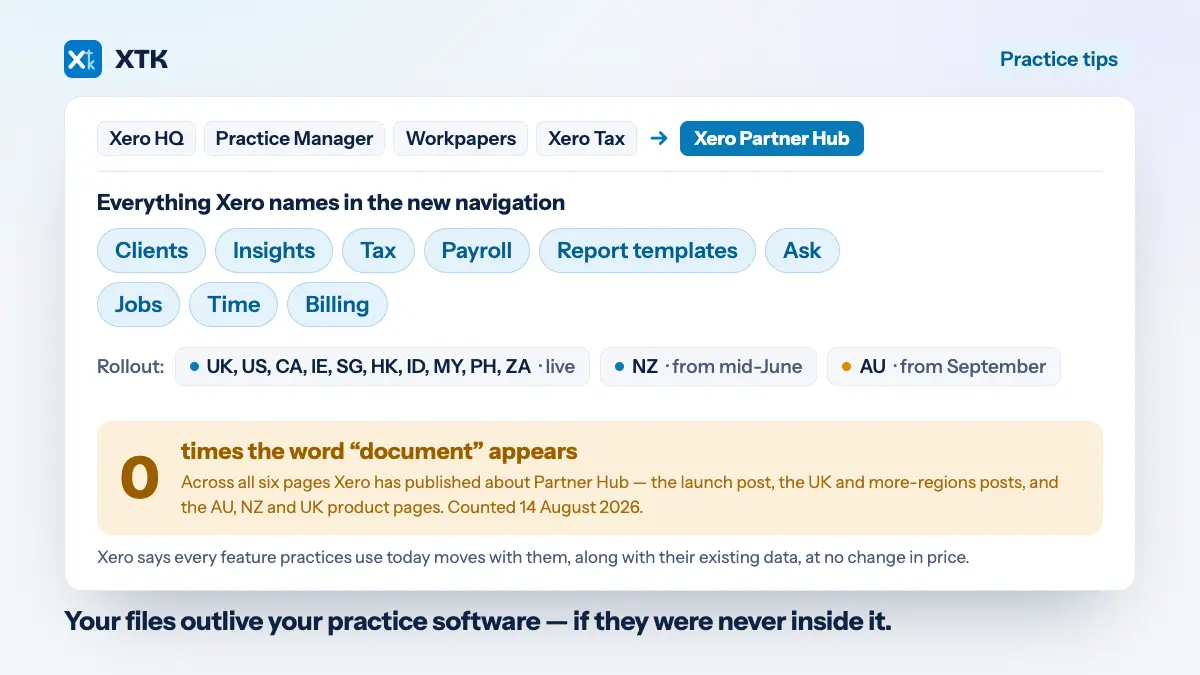
Nothing, as far as Xero has said — and that is the thing worth noticing rather than a reassurance. Xero Partner Hub brings Xero HQ, Xero Practice Manager, Xero Workpapers and Xero Tax together into one product, with one navigation and one client and staff list. Xero says every feature you use today comes with you, your data is switched over for you, and pricing does not change. Across the six pages Xero has published about Partner Hub, the word “document” does not appear once.
That is not a criticism of the release, which looks like a carefully run consolidation. It is an observation about scope. Practice management is being unified; document management was never part of what was being unified, because Practice Manager's document handling was never the part of it Xero was building on. So the migration is a good moment to ask a question that outlives it: when your practice software is reorganised by its vendor, what happens to the client files?
What is Xero Partner Hub, and what does it absorb?
One workspace replacing four products. Xero describes it as bringing everything you use today across Xero HQ, Xero Practice Manager, Xero Workpapers and Xero Tax into a single centralised experience, connecting your existing data as one source of truth. It was announced at Xerocon Brisbane and shaped, Xero says, by feedback from more than 9,000 practices.
The navigation is the clearest statement of scope. In the UK it reads Clients, Insights, Tax, Payroll, Report templates and Ask — and, if you use Xero Practice Management tools, Jobs, Time and Billing alongside them. The homepage is the other half of the pitch: widgets for bank feed status, unreconciled items, an organisation watchlist, a job pipeline showing overdue and due-soon work, and productivity against target. There is also a new workpapers solution built with BGL, and JAX, Xero's AI assistant, sitting across it.
Read that list again as a document manager would. Client records, compliance, workflow, time, billing, tax, insights. It is a thorough list, and there is nowhere in it that a signed engagement letter lives.
When does my practice move?
Most regions have already moved. The transition is automatic and staged by region, and two of the biggest Practice Manager markets are the last two on the list.
| Region | Status | How you move |
|---|---|---|
| United Kingdom | Live for all partners | Already done |
| US, Canada, Ireland | Live for all partners | Already done |
| Singapore, Hong Kong | Live for all partners | Already done |
| Indonesia, Malaysia, Philippines, South Africa | Live for all partners | Already done |
| New Zealand | Automatic from mid-June | Opt in, or wait |
| Australia | Automatic from September | Opt in, or wait |
Australia is the one with a date still ahead of it, and it is a large one — Xero says over 4,000 Australian practices are already using Partner Hub voluntarily. If your practice is in Australia and has not opted in, the move is coming automatically and the useful thing to do with the remaining weeks is in the checklist further down.
What has Xero actually promised?
More than most vendors do during a consolidation, and it is worth quoting rather than paraphrasing. Three commitments run through every page.
- Features survive. All the features you use today will still be there, and the regional pages repeat it in the specific form that matters here — all of the core features and functionality you use today in Practice Manager, Xero Tax and Xero HQ will be available in Partner Hub.
- Data moves for you. Xero switches you over with your existing data, with no heavy lifting required from the practice, and says there is no change to access.
- Pricing does not change. Moving to Partner Hub does not affect how you use or pay for your practice tools. Australia's page states it flatly: no associated pricing or partner program changes. Practice Management itself remains free for Silver partners and above, or a paid upgrade otherwise.
Take those at face value. There is no reason on the public record to expect a practice to lose anything in this move, and an article that implied otherwise would be scaremongering about a migration that thousands of firms have already been through without incident.
So why does this matter for documents?
Because “all your existing features are preserved” is a promise about continuity, not about investment. It tells you nothing will be taken away in the move. It does not tell you which parts of the product are being built on afterwards — and the navigation, the homepage widgets, the workpapers partnership and the AI assistant together make a fairly clear statement about where the next few years of effort are going.
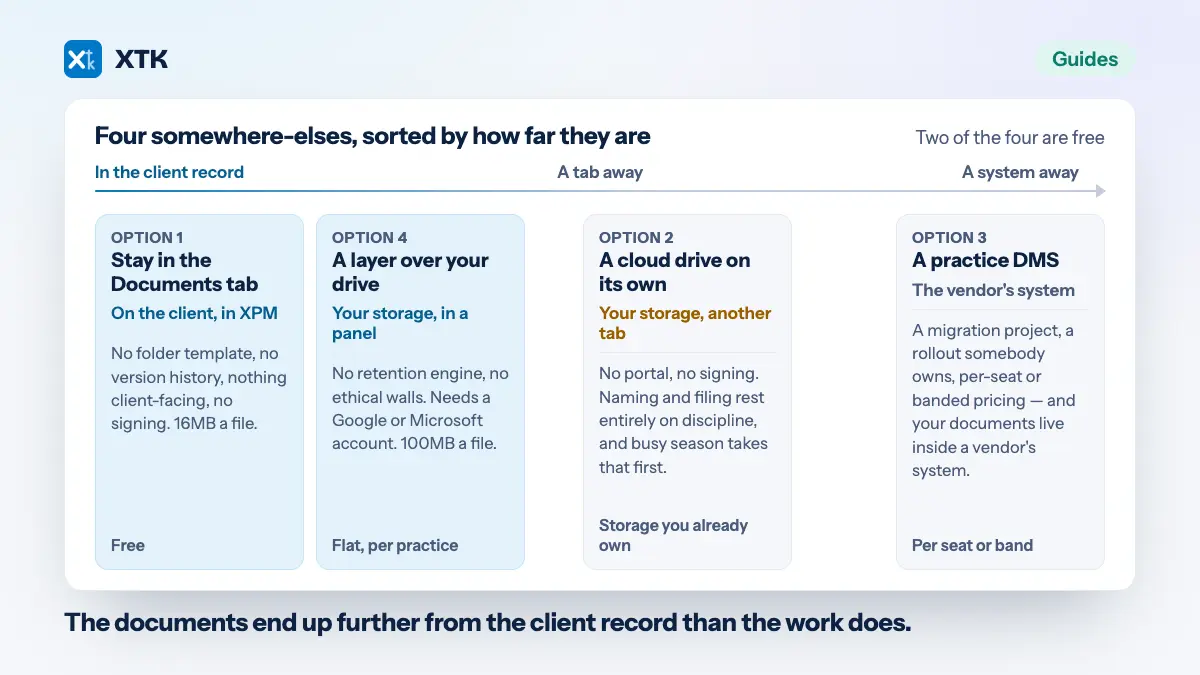
Practice Manager's own document handling was already the thin part of the product before any of this: files attached to a client, job or quote, stored inside Practice Manager, capped at 16MB each, with folders but no template, no version history and nothing client-facing. That was the honest state of it a year ago and the consolidation does not change it either way. What the consolidation does is make the question urgent for a few thousand practices at once: if the platform your documents sit inside is being reorganised by someone else, whose decision is it where your documents live?
The part you can check yourself in twenty seconds
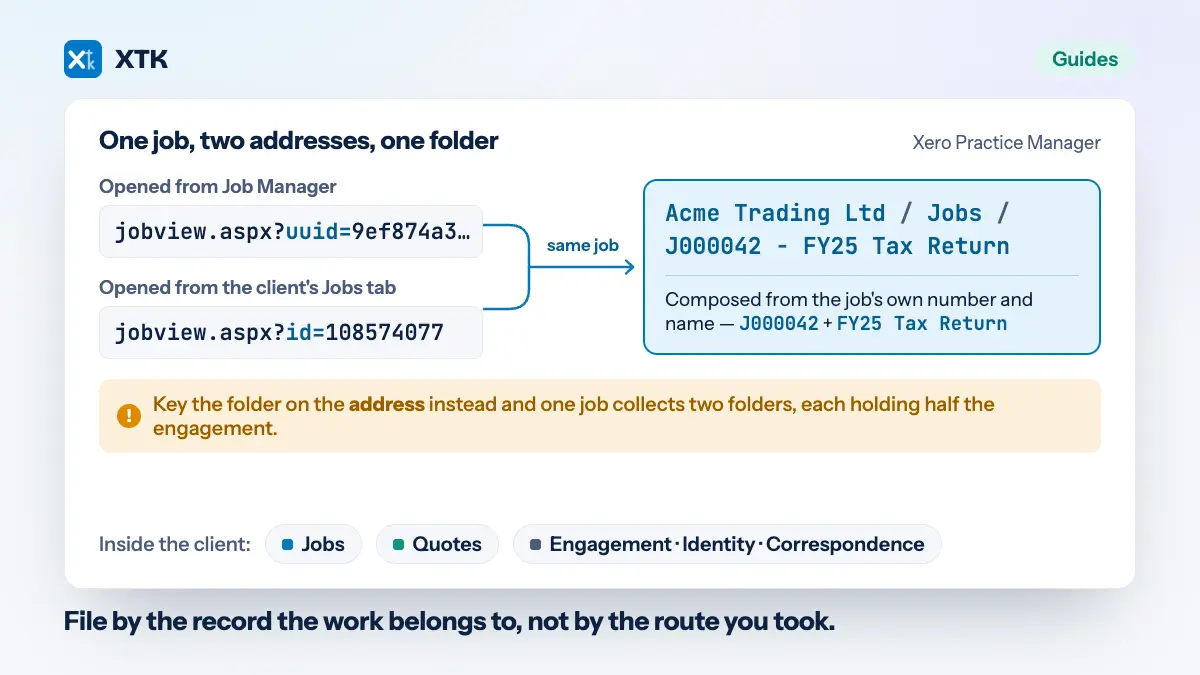
Partner Hub is a new shell over pages of very different ages, and your address bar will tell you which is which. Open a client and you are on the new application, at practicemanager.xero.com. Now open one of that client's jobs, or a quote, and look again: you land on app.practicemanager.xero.com, on a page whose filename ends in .aspx — the older Practice Manager, still doing the work, wearing the new navigation.
This is genuinely useful information rather than a gotcha. It shows you where the modernisation has reached and where it has not, and it tells you that the job and quote pages — the ones where documents attach to a specific piece of work — are the older surface rather than the new one. If you are deciding how much to invest in filing inside those pages, that is a relevant fact, and it is one you can verify without taking anybody's word for it.
What to do before your region's date
Five things, none of which need any product you do not already have. The first two are the ones that actually matter.
- Find out where your client documents live today, honestly. Not the policy — the reality. If the answer is “some in the XPM Documents tab, some in a shared Drive, some in the partner's email”, write that down, because it is the thing a platform change tests.
- Get anything that lives only inside Practice Manager out of it, or accept that it is a copy of record you do not control. Files in XPM's Documents tab are the ones with no existence outside the product, and they are also the ones nobody has a list of.
- Check the staff merge. Xero combines the staff records from Xero HQ and Practice Manager or Xero Tax into a single list, with one record per person. Merged records mean merged permissions, so review who can see what afterwards rather than assuming it carried across as it was.
- Ask your add-ons where they stand. Anything integrating with Practice Manager has had to follow this migration too, and a vendor who cannot tell you their status is telling you something.
- Diarise the date and read the email. The transition is automatic; the only thing worse than being moved is being moved on a Monday in the middle of a filing deadline without having read the notice.
The other Xero change your add-ons are dealing with
Worth knowing while you are asking vendors where they stand, because it lands on the same practices from the other direction. On 2 March 2026 Xero retired its App Store revenue-share model and began pricing API access on two things instead: how many Xero customers connect to an app, and how much data that app pulls out. Five tiers, from a free Starter capped at five connections to Advanced at A$1,445 a month for 10,000 connections and 250GB of egress, with overage at A$2.40 per GB and Enterprise priced on application.
The detail that matters for a Practice Manager firm is buried in the benefits table. The Practice Manager API is a premium feature: not included at Starter, Core or Plus, available only from the Advanced tier upwards, and gated behind a security assessment and use-case approval. So an add-on that integrates with XPM the official, supported way now starts at a four-figure monthly platform bill and an approval process before it has served a single practice.
It is Xero's platform and metering heavy data use is a defensible thing to do. The ecosystem's objection has been about who ends up paying: Dext's chief product and technology officer described the costs as something end customers will ultimately pay as another tax, and a former Xero ecosystem strategist called charging a developer for access to a customer's data double-dipping, since the customer already pays for Xero. Whatever you make of that argument, the arithmetic reaches your practice through the price of your app stack rather than through your Xero bill, which is why it is worth asking about now rather than discovering at renewal.
The durable version of the question
Partner Hub will not be the last reorganisation of the software your practice runs on. There was a Practice Manager before this one, there is a workpapers product changing hands to BGL inside this very release, and there will be another consolidation in five years that nobody has announced yet. Each one arrives with the same reassurances, and most of them are kept.
What decides whether any of it touches your client documents is not the quality of the vendor's migration. It is whether the documents were in the vendor's product to begin with. Files in your practice's own Google Drive, OneDrive or SharePoint are unaffected by a navigation change, a product merger, a rebrand or a cancellation, because nothing about them was ever the vendor's to move. That is a boring property, and boring is the entire point.
Where XTK sits in this
XTK runs inside Partner Hub today, because Partner Hub is served from practicemanager.xero.com and that is where XTK has always worked. It adds its document panel to the client pages there and to the older job and quote pages on app.practicemanager.xero.com, and it files everything into your practice's own Drive, OneDrive or SharePoint. Nothing about the transition required a change, and nothing about it moved a file: the files were never in Practice Manager. It is also outside the API pricing change above, because it is not a Xero OAuth app, holds no Xero credentials, has no App Store listing and makes no Practice Manager API calls — it reads what your own signed-in tab has already loaded, so there are no connections to meter and no egress to bill. One flat price for the practice, unchanged by any of this. That is the whole of the claim — how it reads your Xero data is written out in full, hedges included.
The fair caveat: XTK is a browser extension that renders inside Xero's pages, so it depends on those pages continuing to look roughly as they do. A large enough change on Xero's side is a problem for XTK in a way it is not for the documents themselves — which is exactly the distinction this article is about, and it cuts towards XTK's own architecture rather than away from it. Your files stay ordinary files in your own storage whatever happens to the panel.
Frequently asked questions
What is Xero Partner Hub?
A single workspace that replaces four separate Xero products: Xero HQ, Xero Practice Manager, Xero Workpapers and Xero Tax. It puts client management, compliance work, jobs, time and billing under one navigation, adds a homepage of widgets covering bank feed status, unreconciled items, job pipeline and productivity against target, and includes a new workpapers solution built with BGL and Xero's AI assistant, JAX. Xero announced it at Xerocon Brisbane and says it was shaped by feedback from more than 9,000 practices.
When will my practice be moved to Partner Hub?
Most regions have already moved. As of 14 August 2026, Partner Hub is live for all partners in the United Kingdom, the United States, Canada, Ireland, Singapore, Hong Kong, Indonesia, Malaysia, the Philippines and South Africa. New Zealand practices have been transitioned automatically from mid-June, and Australian practices are transitioned automatically from September unless they opt in earlier. The move is automatic and Xero notifies practices by email, so check your own region's Partner Hub page for the current position.
Will we lose any Practice Manager features in the move?
Xero says no. Its announcement states that all the features you use today will still be there, and the regional pages repeat that all of the core features and functionality currently used in Xero Practice Manager, Xero Tax and Xero HQ will be available in Partner Hub, with no change to access. Xero switches practices over with their existing data and says no heavy lifting is required. Thousands of practices across ten markets have already been through the transition.
Does Xero Partner Hub cost more?
No. Xero states that moving to Partner Hub does not affect how you use or pay for your practice tools, and the Australian page says there are no associated pricing or partner program changes. Practice Management itself remains free for Silver partners and above, or available as a paid upgrade for practices below that tier, exactly as before the move.
What happens to documents stored in Practice Manager's Documents tab?
Xero has not addressed documents specifically — the word does not appear in any of its Partner Hub announcements or regional pages — but its general commitment is that existing data moves with the practice. The practical point for a firm is different: files held in the Documents tab exist only inside Practice Manager, capped at 16MB each, so they are the files whose fate is decided by someone else's product roadmap. Documents kept in the practice's own Google Drive, OneDrive or SharePoint are unaffected by any of it.
Do Practice Manager add-ons still work in Partner Hub?
That depends on the add-on and how it integrates, so ask the vendor directly. Partner Hub is served from the same web address as before, practicemanager.xero.com, and the older job and quote pages are still served from app.practicemanager.xero.com, so tools working inside those pages generally continue to. Tools integrating through Xero's Practice Manager API have a separate change to absorb: since 2 March 2026 Xero prices API access by connections and data egress across five tiers, and the Practice Manager API is a premium feature available only from the Advanced tier — A$1,445 a month — and subject to a security assessment and use-case approval.